It’s no longer a question of if your organisation will face a data loss incident, it’s when … or more accurately how often.
From ransomware attacks that encrypt everything in sight, to SaaS misconfigurations that leave critical data exposed, to human error and cloud platform outages, the threat landscape has evolved fast.
Unfortunately, many backup strategies haven’t kept up.
Backup Strategies Need an Upgrade
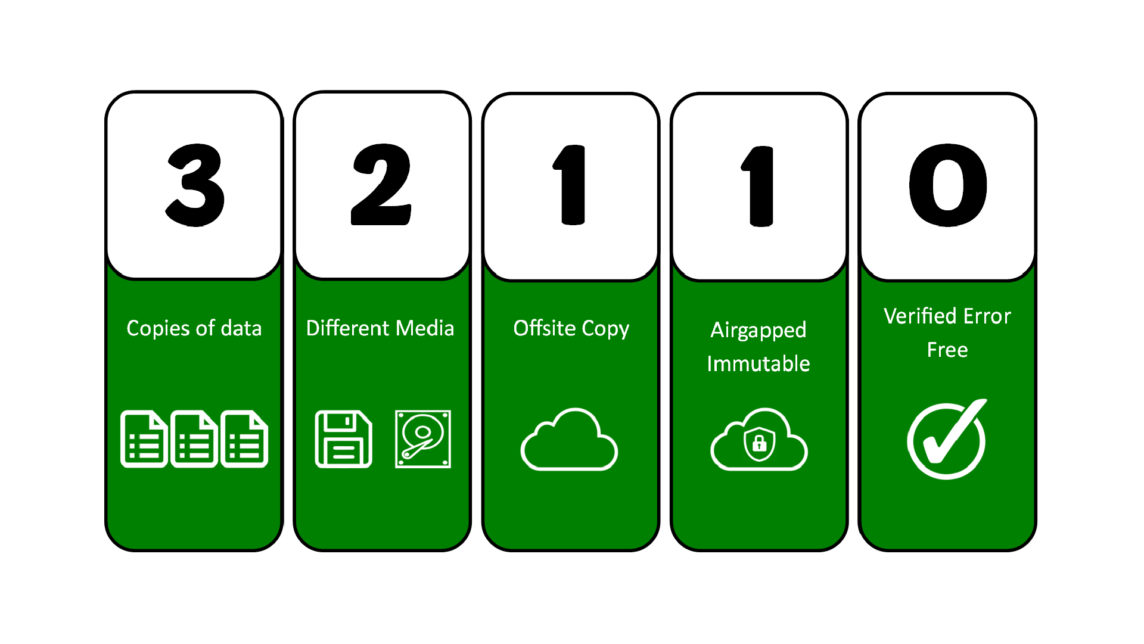
Government bodies like the National Cyber Security Centre (NCSC) recommend the 3-2-1 backup rule. It’s the foundational backup strategy that calls for three copies of your data, on two different media, with one offsite.
But that isn’t enough anymore.
To meet today’s resilience demands – especially in hybrid, SaaS-heavy, or compliance-sensitive environments – we need a smarter, more robust framework.
That’s where 3-2-1-1-0 comes in as it has become the new standard, whether that’s for compliance, insurance purposes, or just simply to help protect against more severe attacks such as ransomware.
This modern upgrade to the original backup rule adds two vital layers:
- 1 immutable copy that can’t be tampered with (protects against ransomware and insider threats)
- 0 backup errors (meaning every backup is verified and restorable)
With backup now a front-line defence against cybercrime, it’s time to go deeper – and show how you can adopt 3-2-1-1-0 in the real world.
What is the 3-2-1 Backup Rule?
The 3-2-1 backup rule is one of the most widely recommended data protection strategies in the world – and for good reason. It provides a simple, effective framework for ensuring your data survives hardware failures, cyberattacks, disasters, and human error.
The rule states:
Keep 3 copies of your data, stored on 2 different media types, with 1 copy held off-site.
Let’s break that down:
- 3 copies
Your production data + two independent backup copies. - 2 media types
For example: on‑prem disk and cloud storage, or SAN + tape.
This prevents a single point of failure. - 1 off-site copy
Stored away from your primary location.
Crucial for resilience against fire, flood, theft, or site-wide cyber incidents.
Why has 3-2-1 become the gold standard?
Because it’s simple, flexible, and effective.
It doesn’t require a specific technology or vendor, and it adapts easily to on‑prem, cloud, hybrid, and SaaS environments. Its core goal is redundancy – ensuring at least one copy survives no matter what goes wrong.
The 3‑2‑1 rule is endorsed by leading cybersecurity bodies – including CISA (Cybersecurity and Infrastructure Security Agency) – as an essential best practice for data protection. Even as technology evolves, the principle remains vital because it addresses the most common causes of data loss: hardware failure, accidents, and localised incidents.
Recognising the Limitations of the Classic 3-2-1 Approach
The 3-2-1 backup rule has been the bedrock of data protection for years – but in today’s threat landscape, it’s no longer enough on its own.
Modern cyber threats, especially ransomware, have exposed critical gaps in the classic approach:
Ransomware targets backups – even offsite ones
Today’s malware is smart. It hunts for connected backup repositories and encrypts or deletes them. If your offsite backups are network-accessible, they’re at risk.
Offsite ≠ Immutable
Just because a backup is stored offsite (e.g. in the cloud) doesn’t mean it’s protected from tampering. Most cloud backups can still be accessed, modified, or deleted – especially if admin credentials are compromised.
Cloud ≠ Immune
Offsite cloud storage is still vulnerable to attack if it’s online and accessible. Poor configurations, unsecured APIs, or stolen credentials can expose your backups to the same threats that hit your production environment.
Restore success is often assumed, not tested
Many organisations never fully test their restore processes. They assume that because backups exist, they will work. But silent corruption, versioning issues, or missing dependencies can break recovery when it matters most.
Human error remains a weak link
From misconfigured retention policies to accidental deletions of backup jobs, human mistakes still account for a huge portion of failed recoveries. Without rigorous validation, these errors often go unnoticed until it’s too late.
The original 3-2-1 rule was built for resilience – but it wasn’t built for ransomware, cloud complexity, or SaaS dependency.
What does 3‑2‑1‑1‑0 stand for?
The updated 3-2-1-1-0 backup rule relates to:
- 3 copies of your data
One production copy + two backups - 2 different types of storage media
E.g. local disk + cloud; SAN + tape; object storage + NAS - 1 copy stored off-site
Physically separate to protect against fire, theft, or regional outage - 1 copy that’s immutable
This version cannot be altered or deleted, even by admin accounts or malware - 0 backup errors
Every backup is tested, verified, and restorable, ensuring confidence at the moment of recovery.
3-2-1+1 = Adding Air-Gapping and Immutability
Backups must be unreachable by attackers, even if credentials are stolen or systems compromised. If YOU have access to edit and modify your backups then so does a cyber criminal!
You therefore need to ensure that the transition from your on-premise backup to your offsite backup is completely separate … separate systems, different logins, secondary MFA … which should provide a basic level of protection and forms the “airgapping” element of the policy.
Immutability is the second and most important element. True immutability should ensure the data cannot be altered, deleted, moved or in any other way affected for a pre-determined period of time neither by YOU, nor your PROVIDER, nor ultimately any would-be attacker.
So this extra “+1” layer:
- Blocks ransomware from encrypting or deleting backups
- Prevents insider sabotage
- Ensures one copy is always safe – even in worst-case scenarios
Many modern backup solutions and storage providers (both on-premise and cloud) support immutability – storage that is Write-Once-Read-Many (WORM) and locked for a defined period. But many are not “TRULY” immutable i.e. you can override the policy. If there is a backdoor for you, there’s a backdoor to be exploited. Therefore we always recommend you confirm the level of lock your storage or service provider can deliver, as not all immutability is created equal.
How will this affect your solution?
If your offsite copy supports immutability, is outside of your primary environment (preferably within a different storage provider) and meets your RTO and RPO needs, then maybe not at all. It could just be a straightforward case of configuring correctly to meet your data-protection needs.
What this element gives you is the knowledge that in the event of accidental data loss, inside threats, or external threats, you can always recover. With backups being a primary target for attack, “just having a backup” is no longer enough, as without any immutability it is very likely that backup will also be compromised.
3-2-1-1+0 = Verifying No Backup Errors
It may seem obvious, but a backup is only as good as the data it captures and protects, yet testing of backups on a regular, planned schedule is missing from many backup routines which is easily done when dealing with the numerous tasks of the day.
Silent failures are the enemy of resilience. Backups that look fine can fail to restore due to:
- File corruption
- Misconfigured job settings
- Incomplete snapshots
- Unsupported system states
Modern backup solutions will “test” backups have been taken correctly (if configured accordingly) but good practice and data-health is a must.
The “+0” layer ensures every backup is automatically validated, through integrity checks or regular test restores – so you know your backups will work when you need them most.
If there are errors, why?
Again modern backup tools will typically come with or can be added to to deliver detailed reports explaining exactly where the errors lie and often how to resolve them.
If you have a larger estate with multiple backup repositories, look into tools that will give you a single pane of glass across the estate so backup jobs can be viewed centrally.
If it’s easy to monitor it’s much more likely issues will be resolved quickly and your data is genuinely resilient.
Why 3‑2‑1‑1‑0 Focuses on Resilience, Not Just Protection
The original 3‑2‑1 rule was built around redundancy. But in today’s environments, that’s not enough.
3‑2‑1‑1‑0 shifts the focus to resilience:
- Can you bounce back after a ransomware attack?
- Will your backups still be there – and usable – if disaster strikes?
- Are your restore processes tested, fast, and reliable?
Immutable Cloud Storage
Services like Wasabi and Amazon S3 Object Lock allow backups to be written in an immutable format – meaning files can’t be altered or deleted, even by admin users or ransomware.
- Ideal for ransomware protection
- Often used as the “+1” immutable copy in cloud-based environments
- WORM (Write Once Read Many) policies ensure time-locked retention
Air-Gapped NAS or Tape Systems
Some businesses still use air-gapped systems – backups stored on devices that are physically disconnected from the network after each backup cycle.
- Examples: USB-attached drives, LTO tape, removable NAS
- Effective for highly secure or compliance-driven environments
- Offline = unreachable
Automated Backup Validation
Modern backup platforms (e.g. Veeam / Commvault) offer automated restore testing. These simulate recovery in sandbox environments, check for corruption, and confirm restore success.
- Supports the “0” part of the rule: no backup errors
- Removes false confidence from untested backups
- Can be scheduled daily, weekly, or monthly depending on RPO/RTO needs
SaaS Reality Check: Most Platforms Violate 3‑2‑1
Many popular SaaS platforms – like Microsoft 365, Google Workspace, or Salesforce – do not meet 3‑2‑1 standards by default:
- Only 1 copy of data
- Stored on 1 platform
- No true offsite/immutable backup
- No guarantee of rapid restore in data loss scenarios
Without third-party backup tools, these platforms leave organisations vulnerable to accidental deletion, ransomware, or user error.
3‑2‑1 vs 3‑2‑1‑1‑0
| Feature / Threat | 3‑2‑1 Backup | 3‑2‑1‑1‑0 Backup |
| Hardware failure | ✅ | ✅ |
| Natural disasters (site-wide) | ✅ | ✅ |
| Ransomware attacks | ⚠️ (limited) | ✅ (immutable copy) |
| Insider threats | ⚠️ | ✅ |
| Backup corruption detection | ❌ | ✅ (tested) |
| SaaS data loss | ❌ (needs third-party) | ✅ (with SaaS backup) |
By adopting 3‑2‑1‑1‑0, you’re not just storing data – you’re preparing to recover it under pressure.
Backup Verification (‘0 Errors’) Is Essential
Backups are only as good as your ability to restore them. Yet too many organisations assume that because a backup exists, it must be valid. That’s a dangerous mistake.
Real-world recovery failures often come down to silent backup errors, including:
- Corrupt backup images that look fine in the dashboard but fail during recovery
- Partial or incomplete restores, where only some data is available
- Lost encryption keys that render otherwise intact backups unusable
- Outdated dependencies or mismatched system states that prevent reboots
In a crisis, these failures can cost days of downtime, lost revenue, or non-compliance penalties – especially if no recent test restores have been performed.
The Fix: Restore Testing and Backup Integrity Checks
That’s why the “0” in 3-2-1-1-0 matters so much. It’s your proof of resilience, not just redundancy.
To meet the “0 errors” standard, we recommend:
- Regular restore testing
Simulate disaster recovery (DR) scenarios – at least quarterly – using real data and environments. - Automated backup reporting
Use tools that alert you to failed jobs, corrupted snapshots, or skipped files – before they become a problem. - Immutable & verified chains
Combine immutability (protection) with integrity (validation). Backup chains should be cryptographically validated and restorable. - Alerting for anomalies
Look for changes in backup size, duration, or behaviour – early warning signs that something’s gone wrong.
From Backup to Business Continuity
In today’s environment, backup isn’t just about ticking a box – it’s about ensuring recovery when it matters most.
A verified, tested backup strategy builds trust:
- In your RTO/RPO planning
- In your DR testing outcomes
- In your ability to survive ransomware or cloud failure
In short, backup integrity = operational resilience.
How to Implement a 3‑2‑1‑1‑0 Backup Strategy
Understanding the 3‑2‑1‑1‑0 model is one thing – putting it into action is where the real value lies. The good news? You don’t need to rip out and replace everything. Most organisations can adopt this strategy through targeted improvements to their existing backup infrastructure.
Step 1: Audit Your Current Backup Environment
Start by mapping your current setup against each part of the rule:
| Rule Element | Key Question |
| 3 copies | Do you have at least two backup copies in addition to your production data? |
| 2 media types | Are your backups stored on two different kinds of storage (e.g. local disk + cloud)? |
| 1 offsite | Is one copy stored in a physically separate location (cloud, remote DR site, tape vault)? |
| 1 immutable | Do you have a copy that can’t be modified, deleted, or encrypted? |
| 0 errors | Do you test and verify backups regularly to ensure successful recovery? |
Step 2: Use Tools That Support the Model
To meet the full 3‑2‑1‑1‑0 framework, choose technologies that align with each component:
✅ Immutable Cloud Storage
- Wasabi with Object Lock
- Amazon S3 with S3 Object Lock
- Microsoft Azure Immutable Blob
✅ Air-Gapped or Offline Options
- LTO tape with vaulting
- Removable NAS devices disconnected post-backup
- Isolated backup networks (not routable from production)
✅ Automated Backup Verification
- Veeam SureBackup
- Commvault IntelliSnap validation
- Backup reporting dashboards with alerts for failures or skipped jobs
Step 3: Deploy a Hybrid Backup Strategy
No single platform covers all bases. A resilient setup spans on-premise, cloud, and SaaS:
- On-Premise: Fast local recovery from disk
- Cloud: Cost-effective, scalable, offsite, truly immutable storage
- SaaS: Third-party backup for Microsoft 365, Google Workspace, Salesforce, etc.
Use replication, tiering, or orchestration tools to manage flow across these environments.
Step 4: Set Backup Frequencies and Test Intervals
You should be performing regular restore tests (and preferably have this automatically monitored). It’s all well and good that when a solution is implemented you are sure of meeting your RPO/RTO objectives but 6-12-18 months in, data has increased, system availability reduced can you be sure these requirements can still be met? Only with a combination of manual and automatic testing.
| Action | Recommended Frequency |
| Backup critical systems | Hourly or daily |
| Backup less critical data | Daily or weekly |
| Verify backup success | Daily |
| Perform test restores | Monthly or quarterly |
| Review backup strategy | Bi-annually or annually |
Step 5: Document Your Policy
Once implemented, document your backup policy clearly – including RPOs, RTOs, backup locations, tools used, and testing schedules. This ensures consistency, accountability, and compliance readiness.
Conclusion: Don’t Let Legacy Backups Be Your Blind Spot
The threats facing today’s organisations aren’t the same as they were five years ago – and your backup strategy shouldn’t be either.
Ransomware. Cloud outages. SaaS vulnerabilities. These aren’t edge cases anymore – they’re weekly headlines.
The 3-2-1 backup rule has served us well. But in a world of ever-evolving cyber risks, it’s time to level up.
3-2-1-1-0 adds the missing ingredients: immutability and integrity. This isn’t just about storing more copies. It’s about ensuring resilience, reliability, and recovery – even in worst-case scenarios.
Start by auditing your current strategy:
- Are your backups immutable or air-gapped?
- Do you regularly test restore success?
- Can you survive a ransomware attack – or just hope to?
How Autodata Helps Implement, Manage, and Validate 3‑2‑1‑1‑0 Strategies
At Autodata, we specialise in making backup resilience real, not theoretical!
Whether you’re just starting to modernise your backup architecture or looking to upgrade an already mature system, we help you map, deploy, and maintain true 3‑2‑1‑1‑0 strategies that fit your infrastructure, budget, and risk profile.
What We Deliver
Immutable Cloud Storage
We work with leading vendors like Wasabi to configure cloud object storage with immutability policies – meaning your backups can’t be deleted, even by admin accounts or ransomware.
On-Premise Ransomware-Resilient Hardware
For clients who have critical, time-sensitive data, we help design on-premise, truly immutable ransomware-resilient, vendor-optimised hardware solutions.
Automated Validation & Reporting
Using backup platforms by Veeam, we build automated workflows that:
- Simulate restores in sandbox environments
- Verify backup integrity
- Send real-time alerts for failures, corruption, or anomalies
- Generate compliance-friendly audit trails
Multi-Platform Integration
We help you apply 3‑2‑1‑1‑0 across hybrid infrastructure:
- On-premise systems
- Public and private cloud platforms
- SaaS apps like Microsoft 365 or Salesforce
No siloed tools. No blind spots.
Strategy, Monitoring, and Support Done For You
We don’t just set it up and walk away. Autodata offers:
- Ongoing backup health checks
- Monthly restore drills
- SLA-driven monitoring and alerting
- Resilience and RPO/RTO advisory services
All backed by UK-based cloud security experts with years of experience building robust, recovery-ready systems.
Outcome: Verified Backup Resilience
When Autodata manages your 3‑2‑1‑1‑0 strategy, you get:
- Full visibility over your backup chain
- Immutable recovery points you can trust
- Documented, tested recovery workflows
- Peace of mind when disaster strikes
Whether you need a backup health check or a complete redesign, Autodata is ready to help you build a truly zero-error, ransomware-resilient backup strategy – aligned to your goals, not just your hardware.
Frequently Asked Questions
What is the 3-2-1-1-0 backup strategy?
It’s a modern, best-practice backup rule that helps protect against data loss, ransomware, and corruption. It means:
- 3 copies of your data
- 2 different storage types (e.g., disk + cloud)
- 1 copy offsite
- 1 copy immutable
- 0 errors, verified by testing and validation
What does the 3-2-1 rule require for business backups?
That you have multiple redundant copies, at least one in a separate physical location. For critical business data, you also need one version that’s not connected to your network – like our Immutable Cloud Storage – to protect from ransomware.
How do you implement the 3-2-1-1-0 rule?
- Use backup software that supports multiple storage targets
- Leverage immutable cloud options (e.g. Wasabi with Object Lock)
- Have one truly immutable copy
- Automate backup testing and validation
- Run routine restore drills to ensure reliability
What is a good backup schedule for 3-2-1-1-0?
- Daily incremental backups
- Weekly full backups
- Monthly archive backups
- And crucially: test restores at least quarterly
What’s the difference between 3-2-1/3-2-1-1-0 and 3-2-2 or 4-3-2?
These are variants:
3-2-1 = baseline resilience
3-2-1-1-0 = modern best practice (adds immutability + verification)
4-3-2 or 3-2-2 = enhanced redundancy but not always practical or standardised
What is the 3-2-1 backup method Reddit talks about?
It’s the classic principle often recommended for home users, photographers, and small businesses alike: 3 total copies, 2 different media, 1 offsite. The ‘Reddit version’ lacks the modern layers (immutability + testing) needed today.
What is the 3-2-1-1-0 data rule vs backup rule?
They’re the same in practice. The “data rule” focuses on protection of information, while the “backup rule” emphasises the process. Both are about ensuring recoverability and integrity.
What is the most common mistake when backing up?
Assuming your backups are working. Without verification, silent corruption or incomplete jobs can go unnoticed, often until it’s too late.
How does the 3-2-1-1-0 strategy defend against ransomware?
The immutable copy (“1”) means attackers can’t alter or delete it. Even if your network is compromised, you can restore safely.